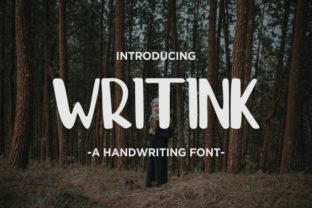
Writink: A Bold Handwritten Font for Creative Workflows
Writink is a handwritten font that brings a natural, bold ink style to digital design. Its strong, expressive characters make it ideal for lettering, doodles, and creative projects where a personal touch is essential. Whether you're designing a logo, creating social media graphics, or working on a branding project, Writink offers a unique aesthetic that stands out in a sea of standard typefaces.
This font is more than just a visual choice—it's a tool that can enhance your workflow by adding authenticity and energy to your designs. Understanding how to integrate Writink into your process can help you achieve better results and streamline your creative decisions.
Understanding Writink and Its Role in Design
At its core, Writink is designed to mimic the look of real hand-drawn text. Unlike traditional fonts that often feel static or mechanical, Writink captures the irregularities and fluidity of handwriting. This makes it particularly useful in scenarios where a human element is desired, such as in branding, editorial design, or personal projects.
For professionals who rely on typography to convey tone and personality, Writink provides a versatile option. It works well in both digital and print formats, making it adaptable to various mediums. Its bold strokes and dynamic shapes allow it to hold its own in large-scale applications while still maintaining clarity and readability.
Using Writink in Different Stages of a Project
Writink can be applied at multiple stages of a creative or business project. Before starting a design, it can serve as inspiration for layout and composition. During the execution phase, it can be used to add visual interest to headings, captions, or callouts. After the project is complete, it can help reinforce brand identity through consistent use across marketing materials.
For example, when developing a new product line, Writink can be used to create mockups that reflect a more organic, artisanal approach. In content creation, it can be used to highlight key points in blog posts, presentations, or email campaigns. The font’s versatility allows it to fit into a wide range of workflows without disrupting existing processes.
Integration with Other Tools and Methods
Writink works well alongside other design tools and platforms. It is compatible with most graphic design software, including Adobe Photoshop, Illustrator, and Canva. This compatibility ensures that users can easily incorporate Writink into their existing design ecosystems without needing to switch tools or workflows.
When paired with other fonts, Writink can act as a complementary element that adds contrast and visual balance. For instance, using Writink for headings while pairing it with a clean sans-serif font for body text can create a cohesive yet dynamic look. This combination is especially effective in branding, where consistency and variety are both important.
Practical Implementation Tips
To get the most out of Writink, consider the following implementation tips:
- Experiment with spacing and sizing: Adjust the font size and letter spacing to ensure readability, especially in larger formats like posters or banners.
- Use it selectively: While Writink is visually striking, overusing it can lead to clutter. Apply it to key elements such as headlines, logos, or decorative accents rather than entire blocks of text.
- Combine with textures or effects: Adding subtle textures or gradients can enhance the handmade feel of Writink, making it more engaging and visually rich.
- Test in different contexts: Preview Writink in various environments—digital screens, printed materials, and mobile devices—to ensure it performs consistently across all platforms.
These strategies help maintain a professional appearance while leveraging the unique qualities of Writink. They also support long-term usability, ensuring that the font remains effective as your projects evolve.
Workflow Examples and Use Cases
Consider these real-world examples of how Writink can be integrated into different workflows:
- Marketing campaigns: Use Writink to create eye-catching headlines for social media ads, email newsletters, or promotional banners. Its bold style draws attention and reinforces brand messaging.
- Branding and logos: Incorporate Writink into logo designs to add a personal, handcrafted feel. This is especially effective for businesses that want to emphasize authenticity or creativity.
- Content creation: Apply Writink to blog post titles, section headers, or infographic labels to break up text and guide readers through the content.
- Personal projects: Use Writink for journaling, DIY crafts, or custom greeting cards. Its expressive nature makes it ideal for personal expression and artistic exploration.
Each of these use cases demonstrates how Writink can be adapted to meet specific needs while enhancing the overall quality of the output.
Factors to Consider for Long-Term Use
When planning to use Writink over an extended period, several factors should be considered:
- Consistency: Ensure that the font is used in a way that aligns with your brand guidelines or design principles. This helps maintain a cohesive visual identity across all materials.
- Compatibility: Check that Writink is supported by all platforms and devices your audience uses. This includes web browsers, mobile apps, and print services.
- Quality control: Regularly review how Writink appears in different formats to address any issues related to legibility or aesthetics.
- Organization: Keep track of where and how Writink is used to avoid duplication or misapplication. This is especially important in team environments or when working on multiple projects simultaneously.
By addressing these factors, users can ensure that Writink remains a valuable asset in their creative toolkit.
Conclusion: Embracing Writink in Your Creative Process
Writink is more than just a font—it's a tool that can elevate your designs and bring a fresh perspective to your work. By understanding its strengths and integrating it thoughtfully into your workflow, you can unlock new creative possibilities and enhance the impact of your projects.
Whether you're a designer, marketer, educator, or hobbyist, Writink offers a practical and expressive solution for adding a personal touch to your work. With the right approach, it can become a staple in your design process, helping you achieve more dynamic and authentic results.